


Your phone already has a clock app. It has alarms. It has timers. It has a stopwatch that nobody has ever started on purpose. So why would anyone build another one?
Because the moment you put Boss respawn into it, you made your alarm clock worse at the one job it actually has.
v1.0 under google’s review 9.10.2026
The 3am list
Think about when you actually look at your alarm list. You’re half asleep, the screen is too bright, and you’re checking one thing: is the morning alarm on? That’s it. That’s the whole interaction.
Now add fourteen entries to that list. Cooldown. Guild war. Energy full. Daily reset. That thing I’ll definitely remember what it was. You are now looking at a list to answer a yes/no question, at the exact hour of the day when you are least equipped to do anything.
Nothing broke. Nothing threw an error. The list just got slightly worse at being a list, and you’ll pay for it some Tuesday.
Your brain learns the sound before it learns the label
Here’s the part that’s harder to notice. An alarm tone doesn’t stay neutral. It becomes a meaning, and your nervous system does that work without asking you.
If the same chime means get up, you have work and also the furnace finished smelting, it slowly stops meaning either one. The first few times, you jolt. After a month, you reach over and silence it before you’re conscious of having heard it — because most of the time, silencing it was the right call.
An alarm you’ve trained yourself to dismiss is not an alarm. It’s a noise with a snooze button.
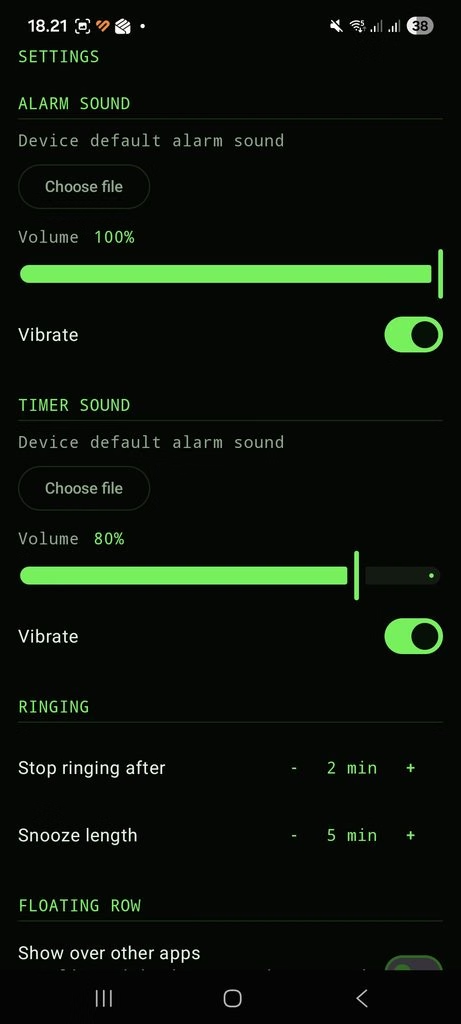
This is why WpE Timer has exactly two sounds, and why they’re separate: one for alarms, one for timers. Each with its own volume and its own vibration setting. Use the same file for both if you want — that’s your call. But the option to keep them apart exists because keeping them apart is the point.
What it is
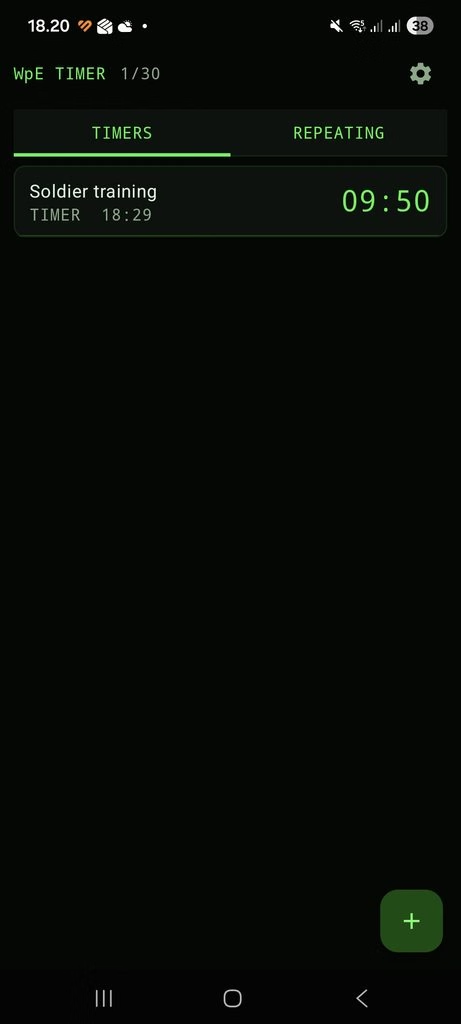
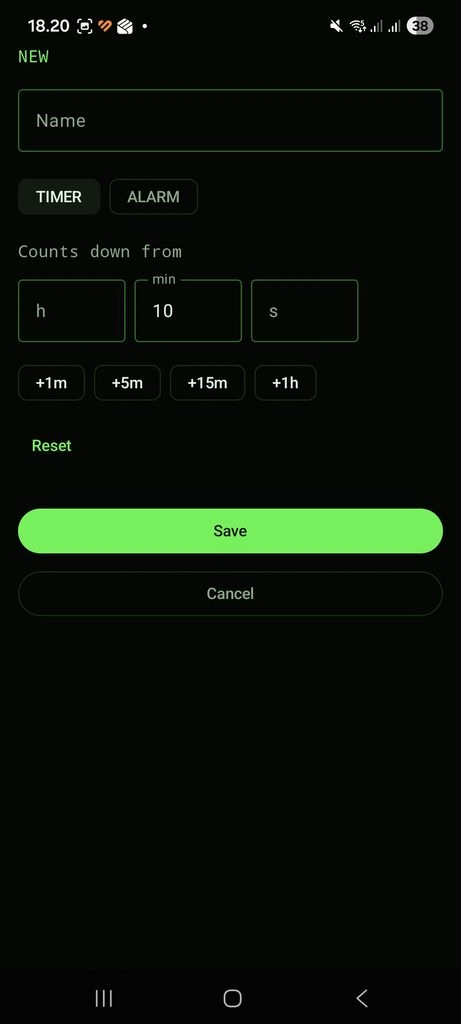
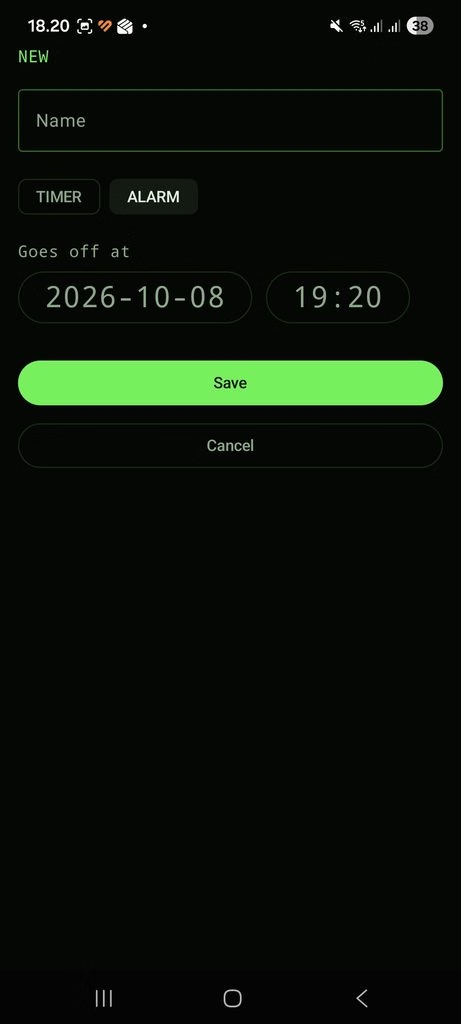
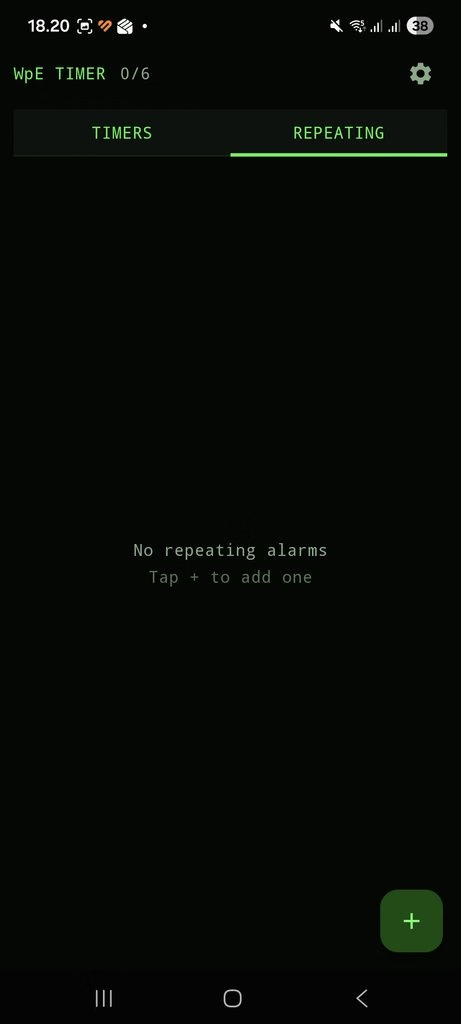
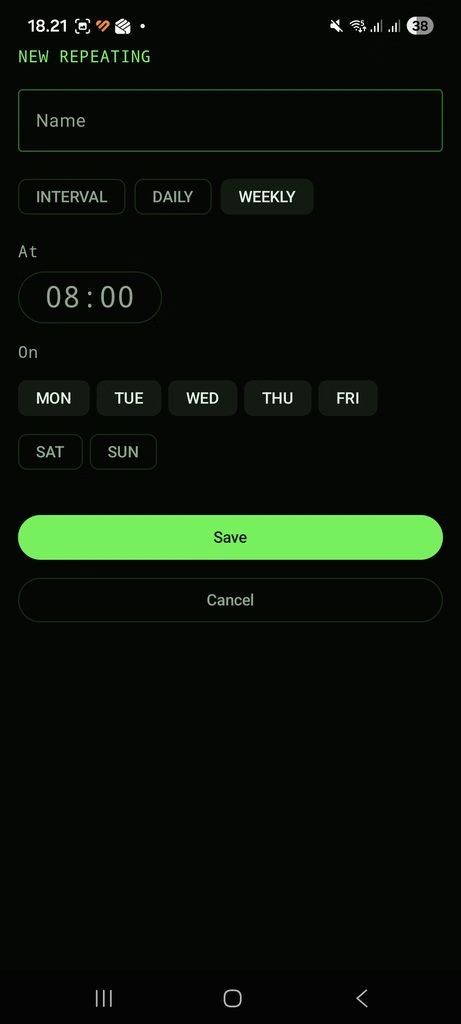
A timer and alarm app that only ever has game stuff in it. Thirty one-shot slots — a countdown when you know the duration, a clock time and date when you know the moment — plus six repeating ones in their own tab for the things that come back every day, every week, or every few hours.
The list sorts itself. Whatever fires next is at the top, always. Six rows on screen, arrows to the other pages, and the number you’re waiting for in monospace so the column doesn’t twitch every second while it counts down.
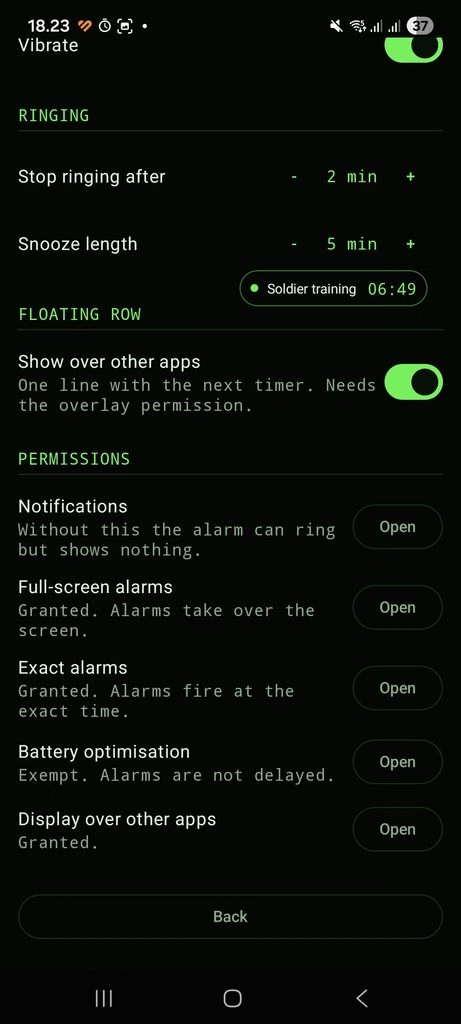
There’s a floating row you can switch on: one line, draggable anywhere, showing only the single next thing and its remaining time. It sits on top of the game. Tap it to open the app. Long-press to make it go away. It shows one timer and not six, because the thing you’re doing is playing a game, not reading a dashboard.
The boring part, which is the actual product
Anyone can draw a countdown. The difference between a timer app and a timer app you’d actually rely on is entirely in what happens when nobody is looking.
- Exact alarms. Not “around then”. Android will happily batch your alarm into a convenient window to save battery, and for most notifications that’s correct. For a respawn it is not.
- It survives a reboot. Phone restarts itself overnight for an update? The alarms are re-armed before the lock screen even appears.
- It takes over the screen. A ringing alarm shows up over the lock screen, not as a notification you’ll find later.
- It tells you when something is wrong. There’s a permissions page that says, in plain words, whether exact alarms are actually granted and whether the app is actually allowed to light up your screen. Most apps hide this. An alarm clock that quietly can’t do its job is the worst possible kind.
None of this is exciting. All of it is the reason you’d stop checking the clock manually — which is the entire thing you set a timer to avoid doing.
What it deliberately doesn’t do
It doesn’t talk to the internet. Not “we don’t collect data”. It doesn’t have permission to open a network connection at all. You can verify that on the store listing. There is no account, no sync, no analytics, no ads, and nothing to opt out of. Your timers are on your phone and nowhere else, and when you uninstall it they’re gone.
It doesn’t know what you’re playing. It doesn’t read your screen, doesn’t hook the game, doesn’t ship a database of respawn tables that’s wrong three patches from now. You type the name and the time.
That sounds like a missing feature. It’s the opposite. It means it works for the games you’ve played for nine years, the gacha you picked up last week, the self-hosted server with the house rules, and the game that launches next month. Nothing to update, nothing to support, nothing to break on patch day.
Who this is for
You know who you are. You have a spreadsheet. Or you had one, and then you gave up on it, and now you just sort of vaguely know that the thing is probably ready. You’ve set a phone alarm for a game event and then felt mildly ridiculous seeing it in the same list as dentist.
It’s a small app that does one thing. It stays out of the way, it keeps your real alarm clock clean, and it goes off when it says it will.
The timer was the easy part. A countdown is arithmetic and a text field. I had the whole thing working in an afternoon.
Then I spent considerably longer than an afternoon finding out that a modern phone has opinions about whether your alarm is allowed to be an alarm.
This is the write-up of what actually broke. Not the architecture diagram — the list of things that were silently wrong on a real device while every build said BUILD SUCCESSFUL.
The alarm rang. The screen stayed black.
Android has a mechanism built exactly for this: a notification can carry a full-screen intent, which is the system’s way of saying “this is important enough to take over the display”. Alarm clocks are the textbook case. I wired it up, read the docs twice, shipped it to my phone.
The alarm rang. The screen stayed black.
The reason is not in the API documentation for the thing that didn’t work. Since Android 14, permission to use a full-screen intent is a special access that Google Play grants at install time, to apps it recognises as alarm clocks. An app you sideload onto your own phone never goes through that gate, so the permission is simply denied — and the notification quietly degrades into a notification.
Nothing logged a warning. Nothing threw. The app did exactly what it was told, and the result was an alarm clock that made noise at a dark screen.
So the app now checks, and tells you. There’s a permissions page that says in plain words whether exact alarms are granted and whether the app can actually light up your screen. An alarm clock that can’t do its job should say so out loud, not discover it at 7am.
Then it happened again, for the opposite reason
Fixed, tested, working. Alarm fires on the lock screen, screen lights up, full-screen view, dismiss button. Good.
Weeks later I was recording the demo video Google requires, with the app running over an actual game. The timer went off. I got a notification in the status bar with Stop and Snooze and nothing else.
Same mechanism. Opposite condition. From the documentation, with the relevant words emphasised:
The system UI may choose to display a heads-up notification, instead of launching this intent, while the user is using the device.
That is correct behaviour and a sensible default. For an incoming call you don’t want the screen hijacked mid-sentence. But I had been testing the lock screen, which is the one state where it works — and the state I was actually building for, phone in hand, game on screen, is the one where the system decides a small banner will do.
Mid-raid is not the moment to be subtle. So the decision no longer belongs to the system: the alarm screen is launched directly, every time, and the full-screen intent stays behind it as a fallback. Which is, it turns out, how alarm clocks have always done this. I just had to find out the long way.
Both of these were found by holding a phone. Neither was findable any other way.
Six attempts at a floating row and a bar that lies
The floating row — one line on top of the game, showing the next timer and its remaining time — is the simplest thing in the app to describe and took six rounds to get right.
The problem: drag it to the bottom of the screen and it ends up underneath the navigation bar’s touch area, where it stops responding. You can’t move it, because you can’t touch it.
Obvious fix: ask the system how tall the bars are and keep clear of them. So I asked, three different ways, and wrote the answers down. Samsung, 1080×2400:
- Live window insets, every type flag set: 78 px
- The system’s own
navigation_bar_heightresource: 126 px - Where touches actually stopped arriving: past 126 px — the row was still unreachable at a position my arithmetic said was clear
Every number the system volunteers is an underestimate, and the one that sounds most authoritative — the live insets, measured from the real window, right now — is the worst of the three. What gets reported is where the bar is drawn. What eats your touches is a larger region, and nothing will tell you its size.
The top edge, incidentally, is fine. The status bar reports itself honestly to this window type, and the row can sit flush against the top. Same code, same call, opposite outcome. The asymmetry isn’t elegant and it isn’t a guess: it’s two different measured results.
There’s also a Reset position button in the settings. Sometimes the honest fix is an escape hatch, and the geometry is unit-tested now — because it went wrong on the device three times, and not once was it visible without the phone in my hand.
The feature I deleted
Early on, the plan was a sound setting per timer. Thirty-six rows, each with its own tone. Maximum flexibility.
It would have meant a nullable column, a fallback chain for when it’s empty, a picker on every row, and a settings screen explaining which setting wins. For a thing you will configure once, in the first ten minutes, and never open again.
What shipped is two sounds. One for alarms, one for timers, each with its own volume and vibration toggle. Use the same file for both if you like.
Two, rather than one, for a specific reason: an alarm tone is not neutral. It becomes a meaning, and your nervous system does that work whether you asked it to or not. If the same chime means get up, you have work and also the furnace is done, it gradually stops meaning either. You learn to silence it before you’re awake enough to have heard it, because most of the time silencing it was the right call. That’s not a feature request. That’s a trained reflex, and it’s the one that makes you late.
Two sounds is the smallest number that keeps those two meanings apart. The third, fourth and thirty-sixth buy nothing.
The privacy claim I can’t make false
The app has no network permission. Not “we don’t collect data” — it has no permission to open a connection at all. No account, no sync, no analytics, no ads, nothing to opt out of.
The useful part isn’t the promise, it’s that the promise is structural. I couldn’t add tracking later without changing the manifest, and that change is visible on the store listing to anyone who looks.
And because good intentions decay, the build script enforces it: every release is opened up, its manifest read, and the build fails if a network permission has appeared. Dependencies drag permissions in through manifest merging without mentioning it. A promise nobody checks is a promise with a shelf life.
The tax you pay before writing a line of app code
A short list, for anyone about to start a native Android project this month:
- The current Gradle plugin brings its own Kotlin. Declaring Kotlin yourself breaks the build, and the Compose compiler has to match the version the plugin bundles — a number you find by reading a POM file, not the release notes.
- The libraries require compiling against the newest Android, while Play requires targeting the previous one. Both at once, which sounds like a mistake and isn’t.
- The SDK folders are named with a minor version now. The old tooling can’t see them if you ask for the round number.
- In a
.propertiesfile, both the backslash and the colon are special. My build script wrote a path with forward slashes to dodge the first problem and walked straight into the second. The linter caught it. The linter was right.
None of this is in a tutorial. All of it costs an evening.
What shipped
A 2.65 MB app with no network access, thirty one-shot timers and six repeating ones, a list that sorts itself so the next thing to fire is always on top, a draggable one-line overlay for while you’re playing, and exactly one alarm registered with the system at a time — the next one — re-armed after every fire, every reboot, every clock change, and once an hour by a watchdog in case all of that failed.
Thirty-four unit tests, most of them guarding the two things that silently rot: which timer is next, and where the floating row is allowed to sit. Zero linter warnings, which is not a brag — it’s that the one real error in the pile was mine, in a file my own script had generated.
